Font Control
in Diagram Editor GUI & SimView
There are 4 ways to make these settings:
- Gui_Setups file,
- Environment Variables,
- Tags in Diagram files (.sim and .dfg),
- Interactively via View menu.
The precedence is:
- Gui-Setups - Weakest.
- Environ-Vars - Overrides "gui_setups".
- In diagram file - Overrides both above.
- Interactively via View menu - Strongest. Overrides all above.
- Gui_Setups file - In your "gui_setups" file, you may add the following settings:
	FontSize_BoxNames = 30
	FontColor_BoxText_rgb = 0 0 1

	FontSize_PortNames = 10
        FontColor_PortText_rgb = 0.5, 0.1, 0.1
			(The Red,Green,Blue (rgb) values are 0.0 to 1.0.)

        FontSize_Annotations = 11
        FontColor_AnnotationText_rgb = 0.5, 0.1, 0.1

        ScaleTextwZoom = Yes      	(Also allowed are: Y, y, True, 1, No, n, False, 0, ... )

	DefaultBoxSize = 0.8 x 3
The "Scale-Text with Zoom" option allows the text to shrink proportionately as you zoom-out -- and enlargen as you zoom-in -- which keeps the text the same size relative to the boxes at almost any zoom level. By default, this option is Off. So the text size does not change with the zoom level.
The "DefaultBoxSize" option is used only in the diagram-editor GUI when you click to add a new box. If you add a new box by stretching a rubberband-line with your mouse, then the default box-size is not used.
Users may have various preferences and needs, depending on the project, the size of diagram, box sizes, and the length of text names being used. So you should select the combination of options that work best for your needs and preferences within any given project.
- Environment-Variables - The following Environment-Variables may be used for the same options as above:
	FontSize_BoxNames=15
	FontSize_BoxTypes=12
        FontColor_BoxText_rgb="0.5, 0.1, 0.1"

        FontSize_PortNames=10
        FontColor_PortText_rgb="0.5, 0.1, 0.1"

        FontSize_Annotations=11
        FontColor_AnnotationText_rgb="0.5, 0.1, 0.1"

        ScaleTextwZoom=Yes      (Also, Y, y, True, 1, No, n, False, 0, ... )
        DefaultBoxSize=2.0x1.0
		(Also allowed: DefaultBoxSize="2.0, 1.0" or DefaultBoxSize="2.0 x 1.0" )
In Bash shells, environment-vars can be set using the export command, as in:export FontSize_BoxNames=15
So that you do not need to re-type these every time, you can place environment-variable settings in your .bashrc file, or a project-specific command file that you source whenever you begin a new working session.In Microsoft Windows, environment-vars can be set using the set command, as in:
set FontSize_BoxNames=15Similarly you can place these settings in a project-specific .bat file that gets executed with any new working session. - Diagram Files - In diagram files (.sim and .dfg), the following tags can be used:
        <FontSize BoxNames="15" />
        <FontSize BoxTypes="12" />
        <FontColor BoxText_rgb="1, 0.1, 0.2"/>

        <FontSize PortNames="11" />
        <FontColor PortText_rgb="0.23, 1, 0.15"/>

        <FontSize Annotations="13" />
        <FontColor AnnotationText_rgb="0.15, 1, 1"/>

        <SCALE_TEXT/>

        <DefaultBoxSize Width="2.0" Height="1.0" />
These may be entered directly with a text-editor, or by changing the settings interactly via View Menu, as described in the next section. - Interactively via View Menu:
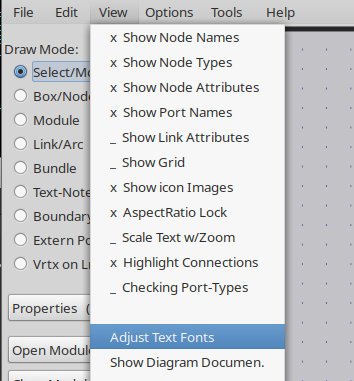
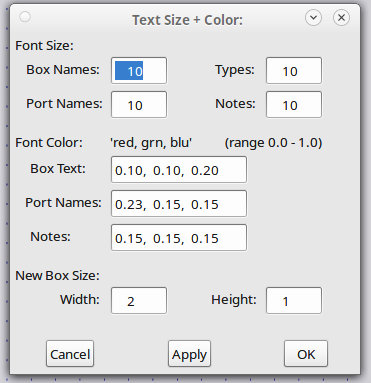
During any Diagram-Editor-GUI or SimView session, you may change any of the above font settings via the "View / Adjust Text Fonts" menu. In the Diagram-Editor-GUI, these changes will be saved in the top diagram file that you are editing, if you save the diagram after making these changes. In SimView, any changes to these settings will persist only during the current session.
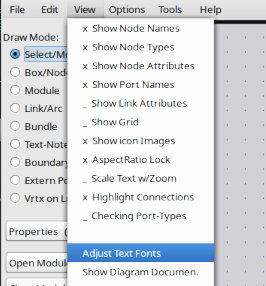
Select from the View menu tab.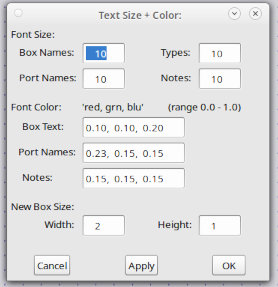
Set the font sizes and colors for boxes, ports, and notes on diagrams.The dialog items should be fairly self-explanatory. If unsure about a value, you can try it by clicking the Apply button to see what it looks like. This way you can iteratively arrive at the best values for your diagrams.
If you change any of the values in the Font dialog in the diagram editor GUI and save the file, the changed values will be saved in the file via the tags described in section 3 above. When you open the file in a future session, or view the diagram in SimView, the changed settings will be used.