 |
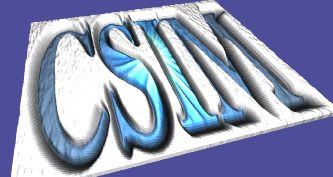
Example output.
Images To Terrains Convertor - Img2WFL_Terrain & Img2WFL_Map

These utilities convert arbitrary images to WFL (WinFrame Language) for
viewing in the WinFrame-3D Viewer.  They accept image files in the PNM
(ex. .ppm) format, and produce the WFL XML format.

The Img2WFL_Terrain and Img2WFL_Map utilities are very similar.
But Img2WFL_Terrain produces a 3D grid of colored polygons, while
Img2WFL_Map produces a 3D textured image.  Img2WFL_Map is usually
preferable, because it can produce higher quality and much more efficient
renderings.  It creates a conformant image texture instead of a polygon grid.


Both utilities accept two image files on the command-line.  The first
provides elevation information, while the second supplies color image.
Sometimes you can use the same file for both.

Differences:

 - For Img2WFL_Terrain, the two images MUST MATCH IN SIZE, but can be
   any size in each dimension.

 - For Img2WFL_Map, the first file can be any size and dimension.
   The second file must be the same size in each dimension (square),
   and must be a multiple of 2.  (ex. 64x64, 128x128, 512x512, etc..).
   It is preferable that the FIRST FILE BE LOWER-RES THAN THE SECOND FILE.

By default, these utilities write their output to a file called "out.wfl".
Please see the options below for other alternatives.

Note:  These utility convert dimensionless images to 3D objects.
Therefore some assumptions must be made about the size-scale of the object,
which in this case is usually considered a contoured terrain-plane.
By default, the utility assumes units of meters.  It scales the images to
reside in the -5 km to 5 km range of the X and Z axes, and scales the
elevation to range in the 0 to 500 meter range of Y axis.  In other words,
it maps the image to a 10x10 km area.  If you wish alternative scale,
please see options below.
|
Download:
  img2wfl_terrain.tgz  (Right-click to save-as)
 (Unpack with: tar xvfz img2wfl_terrain.tgz)

Contents:
  Areadme.txt         - This file.

  img2wfl_terrain.c     - Source file of img2wfl_terrain converter.
  img2wfl_terrain.exe   - Executable compiled for Linux (2.4)

  img2wfl_map.c         - Source file of img2wfl_map converter..
  img2wfl_map.exe       - Executable compiled for Linux (2.4)


Compile:
  cc -O img2wfl_terrain.c -o img2wfl_terrain

  cc -O img2wfl_map.c -o img2wfl_map


Usage:
 img2wfl_terrain  yourelevation_image.ppm   your_colorized_map.ppm

 img2wfl_map   your_elevation_image.ppm   your_colorized_mapimage.ppm


View output:
 wf3d out.wfl


Options:
  -v              - Verbose

  -o filename     - Send output to specified file.

  -suppresscamera - Normally a nominal camera setting is placed at the top
                of the output file for direct viewing in WinFrame.
                However, if you are producing a terrain object for inclusion
                in an existing model which already has camera set-up, then
                use this option to avoid inserting it.

  -xrange  xx     - Set the X-range.  Defaults to 10,000.  Assumes meters.
                    By convention, consider X to be east-west axis in the X-Z plane.

  -yrange  xx     - Set the Y-range, or span of elevations.
                    Defaults to 500.  Assumed in meters.

  -zrange  xx     - Set the Z-range.  Defaults to 10,000.  Assumes meters.
                    By convention, consider Z to be north-south axis in the X-Z plane.


Options Specific to Img2WFL_Map only:
  - subdivide xx  - Causes Img2WFL_Map to break the original texture image into sub-images
                    to reduce the size of the overall image.  This may help with display
                    caching on some video cards.  Sub-division rates of 2, 4, 8, and 16 are
                    supported.  A total of xx-by-xx sub-images are generated and referenced.
See also: WF3d